Tampilkan postingan dengan label Social. Tampilkan semua postingan

Kamis, 11 Agustus 2011

LinkedIn for Android

Android uses your professional network LinkedIn just the push of a button. Go into an interview or a client with the opportunity to see the details and connect with more than 100 million professionals worldwide. Get the latest updates and news from your network and keep it with your status in real-time date.

Recent changes LinkedIn for Android:
* Minor update to solve problems specific device

LinkedIn for Android

Minggu, 31 Juli 2011

Google+ Redirect for Android

Do you want to directly open the "Google+" app when you click links to "Google+" in GMail or browser? In the current version of "Google+" app doesn't support such feature, but using this app, you can directly open the "Google+" app from GMail or Web browser.

Note: The official "Google+" app is required.

Recent changes:
Add Tutorial (1.2).
Redirect to Android Market if Google+ app is not installed.
Add Japanese translation (1.1).
Please contact curry.cat.gti@gmail.com if you can help translation for other languages.


QR CODE Google+ Redirect for Android


Rabu, 13 Juli 2011

Love Poems for Android

Build your relationship, spark the romance! Find and share the best Love Poems. Here you'll find many Quotes for Love, Romance or Friendship.

Read through 1000s of love quotes, or contribute your own creativity! Directly send the love poems as Text, Email or via Twitter.

Enjoy the Love Quotes and Love Poems!
Ideal to send your valentine a romantic message on valentines day!

Recent changes:
- follow people to see their poems
- vote on comments

QR CODE Love Poems for Android

Google+ for Android

Google+ (Google Plus) is still in active development and not yet available to everyone. You need an invitation to sign in.

Google+ for mobile makes sharing the right things with the right people a lot simpler. Huddle lets you send super-fast messages to the people you care about most. With your permission, Instant Upload automatically puts the photos and videos you take into a private album in the cloud, so you can share them anytime, from anywhere. And no matter where you are, the stream lets you stay in the loop about what your friends are sharing and where they’re checking in.

Features:
* Circles let you share the right things with just the right people.
* Stream is where you can get updates from your circles or see what people are saying about things nearby.
* Instant Upload automatically uploads videos and photos to your own private album in the cloud, to make sharing a snap.
* Huddle is super-fast group messaging for everyone in your circles.

Recent changes:
* Spiffy new profile icon o

QR CODE Google+ for Android

Sabtu, 09 Juli 2011

FriendCaster for Facebook

FriendCaster for Facebook (formerly Flow) gives you the best Facebook experience on Android devices!

Advantages of FriendCaster over the standard Facebook for Android app:

General
★ More Secure with Enforced SSL Encryption
★ New ActionBar UI
★ Pull To Refresh (like how the iPhone Facebook does it)
Notifications
★ Gmail Push Notifications. FriendCaster can check for emails that Facebook sends to you telling you that you’ve got a notification.
★ Notifies on Facebook Messages, Friends’ Birthdays & Notifications
★ Notification Popup (which can show over Lock-screen and has Quick Reply). Similar to SMS Popup, Handcent SMS, etc.
Postings
★ Share Links from the Browser easily without being redirected to Mobile Web
★ Ability to select the privacy setting for each Facebook Status/Post you make
★ Ability to Like comments and see how many likes comments have
★ Re-Share your Facebook Friend’s Posts
Friends
★ Add Facebook Friends as Favorites for easy access
★ Ability to Add/Remove Facebook Friends
Photos
★ Upload multiple photos (with Gallery)
★ View the Photos that your Friend’s are tagged in on Facebook
★ View and Tag Friends in Photos on Facebook
★ Upload Photos to Groups and Pages (that you own) on Facebook
Videos
★ Upload Video to Facebook
★ Upload multiple videos with the Gallery App

Other notable features:
- Excellent Widget
- Checkin & Places
- View your Events and Groups
- View Friends, their profiles, photos and albums
- Upload High Resolution Photos
- RSVP to Events, see who’s attending and where it is
- In-built Inbox Messages view
- Vibrate, LED and Sound options

We're adding new features all of the time, so check back often!

Planned Features Include:
- Tablet layouts
- Chat
- Themes
- Contact Syncing

Recent changes:
- Manually resized all graphics for low-end devices. Should make the
app quicker on those devices.
- Lots of Force Close bug fixes
- Fix Advert 'shaking' on Free version

Content rating: Low Maturity

Minggu, 03 Juli 2011

Google+ Invite for Android

Request Google+ access here. App launch google+ invitation page directly from google on your mobile.

Search engine giant Google has just announced its Google+ social networking platform that's set to rival Facebook. Well, that's the plan anyway. Google doesn't have a particularly strong history when it comes to social networking services with both Google Wave and Google Buzz failing to catch on, but if the demo is anything to go by, it's investing a lot of time and money into making its latest venture a potential Facebook killer. Should Mark Zuckerberg and Co be worried? We took an in-depth look at Google+ to see what it brings to the table.

What is it?
Developed under the codename Emerald Sea, Google+ is basically Google's latest attempt at creating a social network. Google is cannily calling it a "project", rather than a "product" - perhaps to avoid comparison with its less successful social products. Google reckons that current online networks (no names mentioned) simply don't cut the mustard and that's why it's launching its own version. According to Google's official blog:

"Today, the connections between people increasingly happen online. Yet the subtlety and substance of real-world interactions are lost in the rigidness of our online tools.

"In this basic, human way, online sharing is awkward. Even broken. And we aim to fix it."

The idea is to topple Facebook from its throne by making every existing Google product socially compatible. The company certainly has a lot to work with, including Picasa, Gmail and Google Maps and information and functions from all of these will be integrated into the Google+ experience so that you don't have to sign into different services to share your photos and let your mates know what you're up to.


Each Google+ profile will centre around the Stream, which is essentially the same thing as Facebook's news feed - where all of your info and updates from your chums are rounded up and constantly updated. The Stream will be joined by four core elements - Circles, Hangouts, Huddle and Sparks - with Google hinting that these are the starting block for future developments.

Circles
Google wants to make sharing online more like sharing in real life - different things with different people. For example, you might want to catch up with your pals about your drunken Saturday night out, but you don't necessarily want your parents in your chat. You can keep your conversations separate by putting your contacts into 'circles' such as 'Work crew', 'Uni mates' and 'Parents'.

Hangouts
As the name suggests, this feature is all about hanging out with your buddies, virtually, or couse. You can choose specific friends, or circles, to invite for a face-to-face video chat and anyone in the Hangout can invite others to join as well. According to Google's demo: "Until teleportation arrives, it's the next best thing". We're not sure about that - it's basically just video calling.


Huddle
You know when you're trying to arrange a night out by having several different text conversations with a number of friends? If so, you'll know how long-winded and confusing it can become. The idea behind Huddle is that you can turn all these exchanges into one big group chat to save you time.

Sparks
Tell Sparks what sort of stuff you're into and it'll send you things that you might be interested in that you can then watch, read or share. For example, you could type 'Films' into the seach box and see what comes up. If you like the results, then you can click the 'Add Interest' button to add Films to your list of important subjects.

When can I get it?
Google+ can currently only be accessed with a special Field Trial invitation, which Google has been sending out at random to Gmail users. There's no set date for a full launch, but we would guess that it won't be too long before Google+ goes live to everyone. In the meantime, you can check out the demo, as long as you have a Google ID.

QR CODE Google+ Invite for Android

Selasa, 28 Juni 2011

Full Version for Facebook

If you have ever wanted a quick and easy way to access the full version of Facebook.com from your android then this app is for you.

Get direct access to the full (non watered down) version of facebook.com from your android device!

Recent changes:
- Upgraded from previous release due to facebook and google's lack of response after the removal of the intial release. After making the requested logo changes from facebook we gave them two weeks to reply.. They did not. This is the improved version that is market compatible and fully legal and following all guidelines from facebook and google. Enjoy =D

QR CODE Full Version for Facebook

GOwidget for Facebook

Facebook GOwidget – More Features gives you the best Facebook experience on Android devices!
Fast Facebook widget makes you more easy to view your time line and your page of Facebook on home screen and share photos with your friends. You must have the newest version of GO Launcher EX installed, which is the most popular home launcher app in Android Market.

Place this widget on your home screen, scroll to view, reply and share photos on your home screen and no need to jump in your Facebook app!!!

Available Size:
-4x4

Actions:
-View
-Like
-Comment
-Share your mind and photos

How to add GOWidgets on your home screen?
-Long press on your home screen in GO Launcher, press the GOWidget option and choose the widget you like. Make sure you have enough room for the widget.

Keywords: GO Launcher EX, GOWidget

qr code GOwidget for Facebook 

Senin, 20 Juni 2011

VZ-Netzwerke

Endlich ist der neue Buschfunk da!

Der Buschfunk mit Kommentaren in Hosentaschenformat!
Nimmt Deine Freunde überall hin mit - egal ob schülerVZ, studiVZ oder meinVZ – und kommentiere die neuesten Ereignisse mit deinen Freunden.

Wenn Du Fehler entdeckst oder uns Deine Meinung zur App sagen möchtest, schick eine E-Mail an: vznetzwerke@googlemail.com

Fehler gefunden? Dann schick uns folgende Infos mit:
- Wo/Was genau?
- Passiert das jedes Mal?
- Was hast Du geklickt, bevor der Fehler aufgetreten ist?
- Wie ist die Nummer Deiner OS Version? (Einstellungen > Allgemein > Info >
Version)
- Welche App-Version hast Du? (VZ-App öffnen > Mehr > Informationen > Über diese Anwendung

Wir freuen uns auf Deine Unterstützung!

Dein VZ-Team

Recent changes:
* Buschfunk mit Kommentaren
* Diverse Bugfixes
* Korrigierter API Key für GoogleMaps

QR CODE VZ-Netzwerke

Rabu, 08 Juni 2011

Facebook Pro Free

If you have ever wanted a quick and easy way to access the Facebook.com from your android phone.then this app can realize it.

key words:
- Facebook
- easy
- quick

Features:
- Favorites.
- Share via SMS,Mail,FaceBook and so on.
- Touch to scroll.
- the web can zoom out and zoom in.

qr code Facebook Pro Free

Jumat, 20 Mei 2011

Text Picture (Ascii Art) for Android

Product Features Text Picture (Ascii Art) for Android

* Use, edit, or create Ascii art text pictures
* Choose from many designs of animals, people, and more
* Copy text pictures and share via SMS, e-mail, or Facebook
* Create your own Ascii art from scratch
* Save text pictures to your favorites

Product Description
Express yourself with Text Picture, tapping into the creative power of Ascii Art. Use regular text characters combined with spaces to make cool pictures and designs. Choose from many pre-made pictures to share including animals, emoticons, and other symbols.

Copy the text art and share with your friends via SMS, e-mail, or Facebook. You can also make your own creations and save them to your favorites!
Developer Info
Focus on Android game and application development
Technical Details Text Picture (Ascii Art) for Android

* Size: 364.8KB
* Version: 2.1
* Developed By: northdroidStudio
Application Permissions: (Help me understand what permissions mean)
o Read only access to phone state.
o Open network sockets.
o Access information about networks.
* Minimum Operating System: Android 1.5
* Approximate Download Time: Less than 10 seconds

QR CODE Text Picture (Ascii Art) for Android

WordPress For Android, Android Application for Management of a WordPress blog

WordPress is one of thousands of CMS (Content Management System) BLOG that much in use by the user to create blogs. WordPress is growing very rapidly and at work on seriously by developers. This can be seen with the more updated and in perbaharuinya this engine when it is found that there are bugs. The developer (Automattic) itself is also expanded to create Wordpress application for the android. Originally WordPress For Android is an application that was developed by a third party, but because of the higher user interest with this application, the parties Automattic ahirnya buy and ask the developer to proceed on their behalf as an official apps.
WordPress For Android, Android Application for Management of a WordPress blog

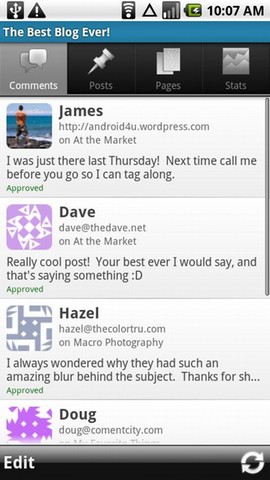
WordPress for Android is an Open Source application that empowers you to write a post to a WordPress-based blog. With WordPress for Android, you can also edit content, and manage your comments just through gadget you android. This application can be used to manage that in a blog on wordpress.com. Besides a blog that is made using your own hosting can also be managed with wordpress application for this android.

With WordPress application for Android, we can read and reply to comments, edit and create new posts and pages, and features latest view visitor statistics. If you want to see user statistics visitor WordPress.com Stats plugin should install on their blog.
Interested in using a WordPress For Android, please download using the QR Image WordPress For Android

Kamis, 19 Mei 2011

Seesmic For Android (Twitter, Facebook, Chatter, Google Buzz)

Product Features Seesmic For Android

Get full access to Facebook , including managing your account and posting to Facebook
Explore and save Twitter searches and trending topics and manage multiple Twitter accounts
Integrate Google Buzz and Salesforce Chatter with this easy-to-use app
Share photos with your friends using popular channels including YouTube and TwitPic
Post your status updates to multiple accounts at once
Seesmic is the best way to manage your social networks in one powerful and yet simple app. You can see and update your Facebook, Twitter, Google Buzz and Salesforce Chatter accounts all at the same time, search and get notifications for new messages! You can share photos, videos and location using the service of your choice like Plixi, yFrog, TwitPic and even YouTube. We also include a widget so you won’t ever miss a single update, from any service.
Our features include:
- Full integration of Facebook, including management and posting to Facebook pages you are an admin of
- The best Twitter client on Android, with all the features you need in a simple but powerful interface: multiple Twitter accounts support, cross-posting, lists, retweets, Twitlonger integration for longer tweets, conversation thread view for public conversations and a lot more!
- Integration of Google Buzz with full inline preview of links and photos
- Integration of Salesforce Chatter, the enterprise social network so you can communicate with your company and exchange information from other networks like Twitter back inside you enterprise

Recent changes:
- Shortcuts: add shortcuts to accounts, the composer, searches, lists, Facebook pages, chatter groups,... directly on your phone home screens, anywhere you want!
- Opening links to Twitter tweets or profiles, as well as Facebook updates and profiles, can open them with Seesmic instead of the browser.
- Ability to Translate updates to your current language in one quick tap!
- Ability to Mark as Spam Twitter users
- Lots of bug fixes and some UI improvements for Android 3.0 Tablets

Content rating: Low Maturity

Product Description Seesmic For Android
Seesmic
Check out the latest news
Seesmic
Access your Twitter and Google Buzz accounts

Social networking has become a mixed bag of websites with some unique and wonderful features. Why not combine everything great about your favorite social networking sites into this efficient and sleek app? Seesmic is a great way to manage your social networks in one powerful yet simple app. View and update your Facebook, Twitter, Google Buzz, and Salesforce Chatter accounts all at once.
Streamline Your Social Life

Search and receive notifications for new messages all on your Android device. You can even share your photos, videos, and location using the service of your choice like Plixi, yFrog, TwitPic, and YouTube. Check out the widget by placing it on your home screen so you'll never miss a single update from any social service. Whether you use your social networking sites to stay in contact with friends, keep up with the latest news, or both, Seesmic is the app for you.
Social Sharing Made Easy

With Seesmic you can see all of your timelines, view private conversations, and receive instant notifications right on your phone. Share photos and videos with your friends using popular tools such as TweetPhoto, yFrog, TwitPic, and even YouTube. You can even share your location by attaching a Geotag to your tweets. Check out where your friends are by viewing their tweets on a map.
Tap to Tweet

Keep your social stream close and right on your home screen with the Seesmic widget to display your latest tweets and quickly update your Twitter and Google Buzz accounts. Simply tap a tweet to read the entire 140-character message or compose a message and send it out to all of your friends. Seesmic provides the best way to manage your Twitter and Google Buzz accounts in one simple app.
Technical Details Seesmic For Android

Size: 2.0MB
Version: 1.7
Developed By: Seesmic
Application Permissions: (Help me understand what permissions mean)
Read only access to phone state.
Get notified that the operating system has finished booting.
Write to external storage.
Open network sockets.
Access fine (e.g., GPS) location.
Access information about Wi-Fi networks.
Access the vibration feature.
Access coarse (e.g., Cell-ID, WiFi) location.
PowerManager WakeLocks to keep processor from sleeping or screen from dimming.
Access information about networks.
Minimum Operating System: Android 1.5
Approximate Download Time: Less than 30 seconds

QR CODE Seesmic For Android   

WordPress For Android

Product Features WordPress For Android

Manage current, or create new, WordPress sites or blogs
Create and edit posts from your mobile device
Upload media from your device library, or capture a new video or picture and upload it right to your blog
Receive comment notifications and moderate multiple comments at a time
Keep track of your site statistics

Product Description WordPress For Android

WordPress for Android is an Open Source app that empowers you to write new posts to your WordPress blog, edit content, and manage your comments directly from your Android device. WordPress is a well-known online Content Management System (CMS) that is commonly used as a blog publishing application.

Manage multiple WordPress sites and blogs or create a new blog from the app. When you launch the WordPress app you are shown a list of added sites and blogs allowing quick access to the site or blog of your choice. You may also delete a blog or change basic settings including account details, media placement, and location information.

The WordPress app allows you to set up notifications. Decide how often you wish the app to be updated and then choose whether your device notifies you by playing a sound, vibrating, or blinking a notification light.
Blog Posts
Blog Posts
Comments

Approve, unapprove, delete comments, or mark them as spam. The comments view also shows you which post was commented and the commenter's information, such as email address or website.
Posts

Add new posts, or choose an existing post to view, edit, delete, or see comments specific to that post. Media, tags, and categories can be added to each post. You may also choose to upload your post immediately or to save it as a draft.
Pages

The WordPress app allows you to create new pages on your site. You may additionally view, edit, or delete a page or view comments associated with a specific page.
Stats

Access statistics about site and post views, referrers, search terms, and clicks. You have the option to view these statistics for multiple time frames: from the last seven days up to the full life of your site or blog.

WordPress for Android supports both WordPress.com and self-hosted WordPress (2.7 or higher) blogs.
Developer Info
Automattic Inc. is a startup from a handful of people passionate about making the web a better place. We are best known for our work on WordPress and other projects but we have a lot of other interesting things in the pipeline as well. We are strong believers in Open Source and the vast majority of our work is available under licenses like the GPL.
Technical Details WordPress For Android

Size: 1.0MB
Version: 1.4.1
Developed By: Automattic, Inc
Application Permissions: (Help me understand what permissions mean)
com.android.launcher.permission.INSTALL_SHORTCUT
CAMERA
Write to external storage.
Open network sockets.
Access fine (e.g., GPS) location.
Access the vibration feature.
Access coarse (e.g., Cell-ID, WiFi) location.
com.android.launcher.permission.UNINSTALL_SHORTCUT
Minimum Operating System: Android 1.5
Approximate Download Time: Less than 30 seconds

QR CODE WordPress For Android 

Senin, 09 Mei 2011

TweetDeck for Android

TweetDeck for Android, Social Networking in the clutch


TweetDeck for Android is your phone's browser to keep you connected with your contacts on Twitter, Facebook, MySpace, LinkedIn, Foursquare, Google Buzz and more. TweetDeck makes it easy to stay up to date and organized wherever you are.

TweetDeck to Android , TweetDeck for Android
Update all with just one click on the web for Android

Update all your friends easily on Twitter, Facebook, MySpace, LinkedIn, and Google Buzz Foursquare. Simply write a message in windows update, see the amount of your character, and then broadcast around the world.

Just a few clicks you can add and also can shorten the link, send pictures, send the location or record video to share
Manage and Update up with TweetDeck for Android

Creating a group for all of your friends on Facebook, so you can follow only those you really want to be heard.

See what your friends are talking about with the photos up, video, links and more with the web for Android. You also can express yourself more easily by sharing photos, links, wall writings, comments and status updates directly from the web.

QR CODE TweetDeck for Android


Selasa, 12 April 2011

Zoorni Mobile

This is the demonstration version of the Zoorni Mobile app. It is NOT intended for general distribution. Please do not download this app or leave comments.

This app is intended ONLY for a limited beta trial group. It WILL NOT WORK on your phone without proper provisioning.

Targets Android 2.1 minSDKVersion = 7


Latest version: 2.1 (for Android version 2.1 and higher)
QR CODE Zoorni Mobile

Sabtu, 09 April 2011

LinkedIn for Android

LinkedIn for Android puts your professional network just a touch away. Walk into any interview or client meeting with the ability to look up the details and connect with over 100 million professionals worldwide. Get the latest updates and messages from your network and keep them up-to-date with your status in real-time.


Latest version: 1.0.0 (for Android version 2.1 and higher)


QR CODE LinkedIn for Android

Selasa, 05 April 2011

Plume for Twitter

Plume is a beautiful, highly customizable Twitter client, which will change the way you feel about Twitter!

Plume is the #1 twitter client for Android, like the two others twitter clients saying so ;-)

Plume was formerly known as Touiteur. (Twitter requested that we change the name)

- Colorize your timeline/friends from Twitter
- Multiple twitter accounts support
- Scrollable beautiful widgets to display your twitter timeline on your home
- mute twitter users, word or clients
- picture preview
- twitter geotagging
- swipe scrolling
- very customizable
- Internal browser
- Autocomplete twitter hashtags and username
- Share photo with Twitpic, Plixi, YFrog
- Bit.ly support for your tweets
- Inline twitter conversation
- Display replies to a tweet
- Display twitter profiles
- a lot more!

Recent changes:
- more visible display of mentions in the timeline using a colored corner (default:off)
- fix the text overlap of the sender client and the date
- fix horizontal scrolling with the trackball/dpad
- add an option to show the time of a tweet rather than a minute/hour difference (default:off)
- add an option to select no extra reply recipient (default:off)
- add support for a custom Twitter server (in case the regular one is blocked)
- better HoneyComb usability
* hotfix for 1.5 users

Latest version: 2.18 (for all Android versions)
QR CODE Plume for Twitter

Rabu, 16 Maret 2011

Plume for Twitter at Android

Plume is a beautiful, highly customizable Twitter client, which will change the way you feel about Twitter!

Plume is the #1 twitter client for Android, like the two others twitter clients saying so ;-)

Plume was formerly known as Touiteur. (Twitter requested that we change the name)

- Colorize your timeline/friends from Twitter
- Multiple twitter accounts support
- Scrollable beautiful widgets to display your twitter timeline on your home
- mute twitter users, word or clients
- picture preview
- twitter geotagging
- swipe scrolling
- very customizable
- Internal browser
- Autocomplete twitter hashtags and username
- Share photo with Twitpic, Plixi, YFrog
- Bit.ly support for your tweets
- Inline twitter conversation
- Display replies to a tweet
- Display twitter profiles
- a lot more!

Recent changes:
- more visible display of mentions in the timeline using a colored corner (default:off)
- fix the text overlap of the sender client and the date
- fix horizontal scrolling with the trackball/dpad
- add an option to show the time of a tweet rather than a minute/hour difference (default:off)
- add an option to select no extra reply recipient (default:off)
- add support for a custom Twitter server (in case the regular one is blocked)
- better HoneyComb usability
* hotfix for 1.5 users

QR CODE Plume for Twitter at Android

Jumat, 04 Maret 2011

Flow Android for Facebook


Flow (formerly f-plus) improves your Facebook experience on Android.

* View Friends, their profiles, photos and albums
* Add Friends as Favourites
* Add/Remove Friends
* View your Likes and Pages you manage
* View your Events and Groups
* RSVP to Events, see who's attending and where it is
* Ability to like comments
* Pull To Refresh
* Checkin
* Places
* Shake to Refresh
* Gmail Push Notifications for Android 1.6+
* Notifies on Messages, Friends' Birthdays & Notifications
* Upload multiple photos with Gallery
* Upload High Resolution Photos
* View and Tag Friends in Photos
* Notification Popup like SMS Popup
* Set photo as Profile Pic
* Tag your Friends in Posts. NO other app can do this!

This is the Ad-Supported Version! Paid version removes ads, extra options and a widget! It's available on here for £0.99!

New! Push notifications through Gmail! See the website for setup info. Similar to how the BlackBerry Facebook application used to work.


=============================
Possible Problems
=============================

If you're having trouble logging in, try uninstalling and then reinstalling. The problem seems to be with the Facebook SDK. I'm investigating.

If you're having trouble with Birthday notifications, I think I've found a reason why. The possible fix is to manually refresh your friends list once every couple of days.

-----------------------------

See the blog for the reasoning behind the name change.

Tags: f+, Blue Notify, f-plus, f plus, bloo, babbler, tweetdeck

Facebook is a registered trademark of Facebook Inc

Recent changes:
v3.2.2
------------------
- Improve look and Flow: colour & icons
- Gingerbread style notifications icons for users running Gingerbread
- Add/Remove friend options under Profile Info.
- Set photo as Profile Pic Menu option on Photo Viewer.
- Changelog Menu option on Main Screen

Latest version: 3.2.2 Free (for all Android versions)
QR CODE Flow Android for Facebook